

Start typing to search packages!
chronocast
By @cfsmi
Roblox
Mirrored from WallyChronocast
A temporal query engine for Roblox. Chronocast records where tracked objects were, then answers questions about the past (what a ray would have hit, which hitboxes a swing would have touched) without rewinding or touching Workspace.
It's built for server-side lag compensation, and works just as well for replays, hit validation, and anything else that needs to ask "where was everything at time T?".
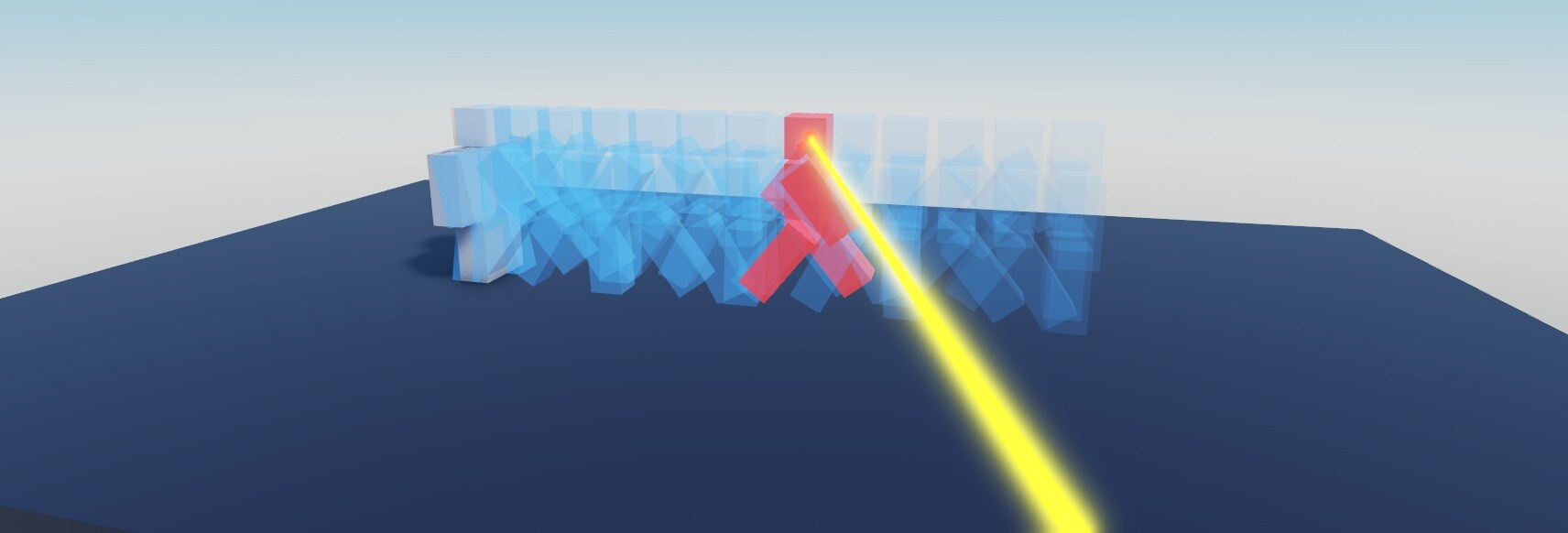
The debug visualizer's output for a walking character: past poses (blue), the pose at the query time (red), and a cast hitting the head at its historical position. The visualizer draws HandleAdornments; for this screenshot they were mirrored as parts, because Studio's capture tool doesn't render adornments.
- Nothing is rewound. States are reconstructed on demand from immutable snapshots; Workspace is never modified.
- Deterministic. The same history, time and query always give the same result, independent of iteration order.
- Lazy and local. A context reconstructs only the timelines a query actually touches, chosen by a spatial index over retained history.
- Per-limb hitboxes.
Collision.FromCharactersamples an animated rig's limbs on every capture, and hits report which limb (hit.Name == "Head"). - Adapter-first. Track Parts and Models out of the box, or anything else (custom physics, NPC simulations) through a two-function adapter.
Install
Wally: add to wally.toml:
[dependencies]
Chronocast = "cfsmi/chronocast@0.1.0"
Model file: download Chronocast.rbxm from the latest release and insert it into ReplicatedStorage.
From source: rojo build default.project.json -o Chronocast.rbxm (or sync default.project.json with Rojo or Argon).
Quick start
On the server:
local Chronocast = require(game.ReplicatedStorage.Chronocast)

-- Track an object. Snapshots are captured automatically on Heartbeat.
local part = workspace.Target
local timeline = Chronocast:Track({
	Id = "Target", -- stable, unique id
	Instance = part, -- or Adapter = { GetTransform = function(self, timeline, time) ... end }
	Collision = Chronocast.Collision.FromPart(part),
	SnapshotInterval = 1 / 30, -- seconds between captures
	HistoryDuration = 1, -- seconds of history kept
})

-- Later: ask about the world as it was 100 ms ago.
local context = Chronocast:CreateContext(Chronocast:GetServerTime() - 0.1)

local hit = context:Cast({ -- the first thing hit, or nil
	Shape = "Ray",
	Parameters = { Origin = Vector3.new(0, 10, 0), Direction = Vector3.xAxis, MaxDistance = 100 },
})
if hit then
	print(hit.Timeline.Id, hit.Distance, hit.Position, hit.Normal, hit.Name)
end

local touching = context:Overlap({ -- everything intersecting, sorted by Timeline.Id
	Shape = "Sphere",
	Parameters = { Origin = Vector3.new(0, 10, 0), Radius = 8 },
})

context:Destroy()
For a complete lag-compensated hitscan weapon (client fires, server rewinds to what the shooter saw, validates and applies headshot damage), see examples/LagCompensation.
Concepts
| Timeline | One tracked object: its adapter, its collision, and a fixed-size ring buffer of immutable snapshots. |
| Context | One instant in time. Creating one does no work; states are reconstructed on first access and cached. |
| Cast / Overlap | Pure queries against a context. They never modify history or Workspace. |
| Collision | Local-space Box, Sphere, Capsule and Compound shapes, recorded per snapshot. |
| Path | Line, Bezier, Ballistic or Custom motion for sweeping a query through space. |
API
Tracking
Chronocast:Track(config) -> Timeline
Chronocast:Untrack(id)
Chronocast:CreateContext(time) -> Context
Chronocast:GetServerTime() -> number -- Workspace:GetServerTimeNow(), the shared server clock
Track config fields:
| Field | Meaning |
|---|---|
Id | Required. Unique non-empty string. |
Instance | A BasePart, or a Model with a stable PrimaryPart. Its transform is CFrame or GetPivot(). |
Adapter | Instead of Instance: { GetTransform, GetVelocity?, GetAngularVelocity?, Metadata? }. |
Collision | A collision definition, or a provider (timeline, time) -> definition? sampled on every capture. |
SnapshotInterval | Seconds between captures. Default 0.033. (SnapshotRate is accepted as an older alias.) |
HistoryDuration | Seconds of history retained. Default 5. |
Metadata | Values, or providers (timeline, time) -> value, recorded with each snapshot. |
A Timeline has GetState(time), GetSnapshots(), SetCollision(definitionOrProvider) and Destroy(). SetCollision affects future captures only; old snapshots keep the collision they were recorded with. If a capture fails, Chronocast logs a warning and untracks that timeline without affecting the others.
Contexts
context:Cast(query) -> CastResult?
context:Overlap(query) -> { OverlapResult }
context:GetState(timeline) -> State?
context:GetSnapshots(timeline) -> { Snapshot } -- history up to the context time
context:Destroy()
- Cast takes a
Ray, or aSphere,BoxorCapsuleswept along aPath. It returns{ Timeline, Distance, Position, Normal, Name }.Distanceis exact ray travel, or approximate travel along the path. - Overlap takes a
Sphere,BoxorCapsule(optionally along aPath). It returns one representative contact per target,{ Timeline, Position, Normal, Name }, sorted byTimeline.Id. It has noDistance. Positionis on the target's historical surface andNormalpoints out of it.Nameis the hit shape's name, e.g. a limb.- Every query accepts an optional
Filter = function(timeline) return boolean end. - Malformed queries raise errors with clear messages; results are frozen.
- A context sees only the timelines that existed when it was created. A state, once read, is reused for the context's lifetime even after its snapshots roll out of the buffer.
- Times outside recorded history use the nearest snapshot; Chronocast never extrapolates.
Query parameters:
| Shape | Parameters |
|---|---|
Ray | Origin, Direction, MaxDistance? (give one: unbounded rays scan every timeline) |
Sphere | Origin, Radius |
Box | Origin or CFrame, Size |
Capsule | Origin or CFrame, Radius, Height (distance between cap centres) |
With a Path, each sampled pose supplies the Origin/CFrame.
Context:Query and Chronocast:Query are the older single-result API. They still work but are deprecated.
Collision
Chronocast.Collision.Box({ Size, Offset?, Name? })
Chronocast.Collision.Sphere({ Radius, Offset?, Name? })
Chronocast.Collision.Capsule({ Radius, Height, Offset?, Name? })
Chronocast.Collision.Compound({ children }, offset?)
Chronocast.Collision.FromPart(part, reference?)    -- Ball -> Sphere, everything else -> oriented Box
Chronocast.Collision.FromModel(model, reference?)  -- bounding Box of all parts
Chronocast.Collision.FromCharacter(character, { IncludeAccessories?, Filter?, Reference? }?) -- per-limb provider
Chronocast.Collision.Custom(definition)
Offsets are local to the transform the timeline's adapter returns. FromPart and FromModel default their reference to part.CFrame and model:GetPivot(); pass the adapter's frame if it differs. FromCharacter skips HumanoidRootPart and accessories by default. Cylinders and meshes use conservative oriented boxes.
Paths
Chronocast.Path.Line({ Start, End, Intervals? })
Chronocast.Path.Bezier({ P0, P1, P2, P3, Intervals? })
Chronocast.Path.Ballistic({ Origin, Velocity, Gravity?, TotalTime?, Intervals? })
Chronocast.Path.Custom({ Sample = function(self, alpha) return CFrame end, Intervals? })
A path is tested at Intervals + 1 discrete poses, endpoints included (Samples is an older alias for Intervals). It is not continuous swept collision: a fast-moving query can step over a thin target between poses, so raise Intervals when that matters.
Debug visualizer
local viz = Chronocast.Debug.Visualizer({ Lifetime = 2 }) -- also: Parent, Adornee, Color, QueryColor, HitColor, Transparency
viz:DrawTimeline(timeline, context)     -- historical collision at a context (or a time)
viz:DrawTrail(timeline, { Step = 0.1 }) -- fading ghost poses through retained history
viz:DrawCast(query, hit, context)       -- the ray or path, hit point, normal and hit target
viz:DrawOverlap(query, results)
viz:Clear()
viz:Destroy()
It draws HandleAdornments adorned to Terrain, so it creates no physical parts.
Types
Chronocast.Types exports Luau types for every public shape: TimelineConfig, Adapter, CollisionDef, State, Snapshot, QueryParams, CastResult, OverlapResult and more.
Performance
Measured in Roblox Studio with tests/Benchmark.lua. Each timeline is one capsule in a 2000 × 2000-stud world, captured 30 times a second with 1 s of history. Each query creates and destroys its own context.
| Timelines | Capture, per captured frame | Ray, 150 studs | Ray, unbounded (full scan) | Sphere overlap, r = 25 |
|---|---|---|---|---|
| 50 | 0.27 ms | 6.6 µs | 0.46 ms | 4.9 µs |
| 200 | 1.04 ms | 23 µs | 1.9 ms | 12.5 µs |
| 1000 | 6.05 ms | 67 µs | 10.6 ms | 43 µs |
Bounded queries only reconstruct timelines whose retained history passes near the query, so their cost follows how many objects are nearby, not the size of the world. Capture cost grows linearly with tracked timelines. At 1000 timelines it's about 6 ms on each frame that captures, so raise SnapshotInterval for objects that don't need fine history. Results vary by hardware; run the benchmark on yours.
Limitations
- Swept queries sample discrete poses; there is no continuous collision detection.
- Collision primitives are boxes, spheres and capsules; cylinders and meshes are approximated by oriented boxes.
- Interpolated states use the preceding snapshot's collision. Character limb layouts are not interpolated between snapshots.
- Overlap contacts are one representative point per target, not a full contact manifold.
- History is bounded by
HistoryDuration; older queries see the oldest retained snapshot.
Contributing
See CONTRIBUTING.md for the development setup, the test suites (in Studio and headless) and the checks CI runs. Background design notes are in docs/design.
License
MIT
Package Details
Install command (Click to copy)
Version
0.1.0
License
MIT
Safe for commercial use
Automated license review — not legal advice.